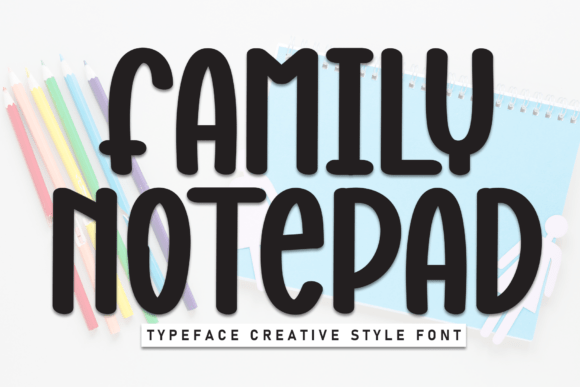
Family Notepad: The Display Font for Playful Web Design
When selecting Fonts for digital interfaces, the choice between strict minimalism and expressive personality is often a balancing act. Family Notepad emerges as a compelling solution for designers seeking to inject warmth without sacrificing structural integrity. This display font combines a playful charm with a clean, bold structure, making it perfect for creative and casual projects that need to stand out in crowded digital spaces. Its rounded, tall letterforms feature smooth strokes and a balanced weight that ensures legibility even at larger sizes, bridging the gap between decorative appeal and functional web typography.
Why Family Notepad Enhances Visual Hierarchy on Landing Pages
The primary challenge in modern web design is capturing attention within seconds while maintaining a professional aesthetic. Family Notepad addresses this by offering a distinctive visual anchor that guides the user’s eye naturally through the content. As a Display typeface, it excels in hero sections where large-scale text requires immediate impact. The font’s unique character—defined by its upright yet soft geometry—creates a friendly brand tone that encourages users to stay longer and explore further. Unlike rigid sans serifs that can feel cold, or overly complex scripts that hinder scanning, Family Notepad strikes a middle ground. It signals approachability and creativity, which is essential for brands aiming to build trust quickly. By using this font for main headlines, designers can establish a clear visual hierarchy that separates key messages from body copy, ensuring that the most important conversion points are noticed immediately.
Optimizing Family Notepad for Mobile Readability and Responsive Layouts
In an era where mobile traffic dominates, any font used for web design must perform flawlessly across varying screen sizes. Family Notepad proves particularly effective in responsive design due to its tall letterforms and open counters (the negative space inside letters like 'o' and 'e'). These structural elements prevent the text from feeling cramped on smaller devices, such as smartphones, where space is at a premium. When applied to call-to-action buttons or short promotional phrases, the font remains distinct and readable, reducing cognitive load for the user. However, strategic sizing is crucial; because it is a display font, it should be reserved for headings rather than long paragraphs. Using Family Notepad for subheadings or section titles allows the design to breathe, creating rhythm and pacing that improves the overall user experience. For online store owners, this means product banners and sale announcements will look polished and inviting, directly supporting higher engagement rates.
Building Brand Identity with Creative Portfolio and Boutique Store Designs
For creative entrepreneurs, bloggers, and boutique shop owners, consistency in brand identity is paramount. Family Notepad serves as a versatile tool for establishing a cohesive online presence across various touchpoints. Whether you are designing a personal portfolio, a coaching website, or a digital product sales page, this font adds a layer of curated charm that feels both intentional and effortless. The playful nature of the typeface suggests innovation and human-centric values, qualities that resonate strongly with audiences looking for authentic connections. When paired correctly, Family Notepad can define the voice of a brand without needing excessive graphic elements. Imagine a landing page for a handmade jewelry brand or a wellness app; the font’s smooth strokes and bold presence convey quality and care. This alignment between typography and brand message helps differentiate your digital products from competitors who rely on generic template designs.
Effective Font Pairing Strategies for Digital Content Sections
A common mistake in web design is overusing decorative fonts, which can lead to visual fatigue and reduced readability. To maximize the impact of Family Notepad, it is essential to pair it with neutral, highly legible typefaces for body text. A simple sans serif font, such as Inter, Roboto, or Open Sans, works exceptionally well alongside Family Notepad. The contrast between the expressive, rounded display font and the clean, functional body copy creates a dynamic yet harmonious layout. This pairing strategy allows the designer to use Family Notepad sparingly but effectively—for titles, pull quotes, or button labels—while letting the body text handle the informational heavy lifting. Alternatively, for a more editorial or sophisticated digital identity, pairing it with a classic serif font can add depth and tradition to the design. The key is to let each font do what it does best: one captures attention, and the other delivers clarity. This thoughtful combination enhances the overall professionalism of the site, ensuring that the design feels complete and considered.
Practical Applications for Banners, Ads, and Social Media Graphics
Beyond static website headers, Family Notepad offers significant utility in marketing materials and social media graphics. In the realm of digital advertising, where space is limited and competition is fierce, a unique typeface can increase click-through rates by breaking the visual monotony of standard ads. The font’s bold structure ensures that key messages pop against colorful backgrounds or image overlays. For e-commerce businesses, using Family Notepad in email newsletters or promotional banners can reinforce brand recognition and drive urgency. Its casual yet polished vibe makes it suitable for seasonal campaigns, flash sales, or new product launches. Furthermore, when creating digital templates or downloadable assets, including this font adds value for clients who want their final designs to have a bespoke, handcrafted feel. It transforms ordinary layouts into memorable experiences, proving that small typographic choices can have a large impact on conversion metrics.
Technical Considerations and Licensing for Commercial Web Projects
Before integrating Family Notepad into a client project or commercial website, it is vital to review the technical specifications and licensing terms. Ensure that the font package includes all necessary weights and styles required for your design system, such as regular, bold, or italic variants if available. Check for webfont compatibility, ideally in WOFF2 format, to ensure fast loading times and cross-browser consistency. Additionally, verify multilingual support if your target audience speaks multiple languages, as not all display fonts include extended character sets. Commercial licensing is another critical aspect; most high-quality display fonts require a specific license for web embedding, especially if the site generates revenue or is used for business purposes. Understanding these details upfront prevents legal issues and ensures that the font renders correctly for all visitors. By treating typography as a core component of your digital infrastructure, you protect your brand’s integrity and provide a seamless experience for your users.