Dicon: A Bold Display Typeface for Editorial Impact
When designing high-stakes editorial layouts, Dicon emerges as a bold and striking display font with a unique twist that demands attention. Its strong, thick letterforms create a powerful presence on the page, immediately capturing the reader’s eye before they even begin to read the body copy. For publishers, bloggers, and content creators who rely on visual hierarchy to guide readers through complex articles, ebooks, or newsletters, selecting the right typeface is not merely an aesthetic choice—it is a functional necessity. Dicon offers a distinct personality that can elevate publication branding, making it an essential asset for modern digital and print design workflows.
Why Dicon Defines Modern Editorial Branding
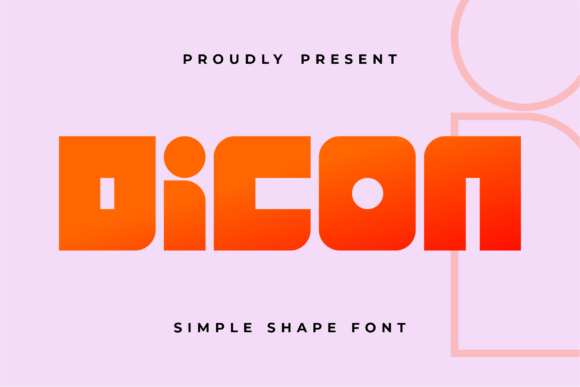
In a crowded digital landscape, standing out requires more than just compelling text; it requires a visual identity that resonates instantly. Dicon, categorized under the broad spectrum of Display Fonts, provides exactly this kind of authoritative voice. The font’s distinctive “I” marked with a dot adds a creative and memorable detail, serving as a subtle yet effective signature element that distinguishes your brand from generic templates. This level of specificity is crucial for independent content brands and magazine designers who need their typography to feel bespoke rather than borrowed. By integrating Dicon into your style guides, you establish a consistent visual tone that signals professionalism and creativity to your audience.
The weight and structure of Dicon are engineered to hold space. Unlike lighter sans serif fonts that can get lost in dense blog posts, the thick letterforms of Dicon command respect. This makes it ideal for cover texts, major section headings, and pull quotes where the goal is to interrupt the scrolling pattern and force engagement. When used correctly, it transforms a standard article layout into a curated editorial experience, guiding the reader’s focus precisely where you intend it to go.
Optimizing Blog Headers and Magazine Covers
For bloggers and digital magazine editors, the header is the first point of contact. Using Dicon for blog headers allows you to inject energy and clarity into your content strategy. Whether you are launching a new lifestyle blog or redesigning an existing publication, the robust nature of this display font ensures that titles remain legible and impactful across various screen sizes. The font’s ability to convey strength without sacrificing elegance makes it suitable for a wide range of niches, from tech reviews to fashion editorials.
Consider the application of Dicon in magazine covers. Here, the font’s strong presence is critical. It needs to compete with images and other graphical elements while remaining readable at small thumbnail sizes on social media feeds. The thick letterforms provide the necessary contrast against busy backgrounds, ensuring that the headline pops. Furthermore, the unique dot on the “I” can be leveraged as a design anchor, perhaps replacing a bullet point in subheadings or highlighting key terms within a teaser blurb. This small detail reinforces the idea that every element of your publication has been thoughtfully designed, enhancing perceived value and reader trust.
Enhancing Ebook Titles and Printable Guides
Ebook creators and course developers often struggle with making their digital products look premium. Standard system fonts can make a paid guide feel like a free download, but upgrading to a professional premium font like Dicon changes that perception entirely. When applied to ebook titles, chapter openers, and worksheet headers, Dicon adds a layer of sophistication that justifies the price point. Its bold character works exceptionally well for lead magnets and downloadable PDFs, where the document serves as a tangible representation of your expertise.
In the context of printable planners, workbooks, and educational materials, readability and visual appeal must coexist. While Dicon is not intended for long-form body text due to its heavy weight, it excels as an accent typography tool. Use it for the main title of a workbook, the headers of daily tasks, or the call-to-action buttons in a digital PDF. The distinctive details of the font help break up monotony in structured layouts, keeping the user engaged as they navigate through pages of information. This strategic use of display fonts supports better retention rates by making the learning material feel visually stimulating and professionally produced.
Strategic Font Pairing for Editorial Layouts
No single typeface can do everything, which is why understanding how to pair Dicon is vital for successful editorial design. Because Dicon is a display font with such a strong personality, it requires a balanced partner for body copy. A clean sans serif font or a highly readable serif font creates the perfect counterpoint. For instance, pairing Dicon with a classic serif like Garamond or Merriweather can evoke a traditional, trustworthy newspaper aesthetic, ideal for journalism or historical content. Alternatively, combining it with a geometric sans serif like Helvetica or Montserrat yields a modern, minimalist look suited for tech blogs or contemporary design portfolios.
This pairing strategy extends beyond just aesthetics; it impacts usability. The high contrast between the bold display headings and the lighter body text establishes a clear visual hierarchy. Readers can quickly scan a page, identifying sections via Dicon headings, before diving into the detailed text. This efficiency improves the overall user experience, reducing bounce rates and encouraging deeper engagement with your content. Additionally, when designing for mobile devices, where screen real estate is limited, this clear hierarchy becomes even more important. Dicon helps compress information density, allowing you to convey structure quickly without overwhelming the reader.
Practical Applications in Social Media and Newsletters
Beyond static documents, Dicon proves versatile in dynamic content formats. For newsletter writers, creating engaging subject lines or preview pane graphics can significantly boost open rates. Using Dicon for these short bursts of text ensures they stand out in a cluttered inbox. Similarly, for social media graphics, particularly Instagram carousels or Pinterest pins, the font’s boldness translates well to square or vertical formats. The unique dot on the “I” can be highlighted using color or size variations to draw attention to specific keywords, increasing click-through rates.
When creating quote graphics or testimonial cards, Dicon can frame the statement with authority. Placing a powerful quote in Dicon gives it weight and importance, making it more likely to be shared by followers. This utility extends to client publications and branded presentations, where consistency in typography reinforces brand recognition. By maintaining a cohesive typographic voice across all touchpoints—from email newsletters to printed brochures—you build a stronger, more memorable brand identity.
Technical Considerations and Licensing
Before implementing Dicon in your projects, it is prudent to review the technical specifications included with the font file. Check for available weights, alternates, and ligatures that might enhance your design options. Multilingual support is also a key consideration if your content targets international audiences, ensuring that special characters render correctly. From a legal standpoint, always verify the commercial licensing terms. If you are using Dicon for ebooks, templates, printables, or paid newsletters, ensure you have the appropriate license to avoid copyright issues. Investing in a proper commercial font license protects your business and supports the type designers who create these valuable assets.
Ultimately, Dicon is more than just a set of characters; it is a tool for communication. Its bold, striking nature and unique details make it an excellent choice for designers who want to leave a lasting impression. By integrating this display font into your editorial workflow, you enhance readability, strengthen your brand, and create content that truly stands out in a noisy world.